Thursday, 19 October 2017

How to make KBC game in C# (part-3/5)
using System;
using System.Collections.Generic;
using System.ComponentModel;
using System.Data;
using System.Drawing;
using System.Linq;
using System.Text;
using System.Threading.Tasks;
using System.Windows.Forms;
using System.Data;
using System.Data.SqlClient;
using System.Configuration;
namespace kbc
{
public partial class QUIZ : Form
{
int[] x = new int[15];
int p = 0;
string ansfromdb, ansselect;
public static string score;
returnclass rc = new returnclass();
int qid;
private string connstring = ConfigurationManager.ConnectionStrings["kbc"].ConnectionString;
public QUIZ()
{
InitializeComponent();
}
private void QUIZ_Load(object sender, EventArgs e)
{
// label2.Text = startgame.NAME;
Random r = new Random();
qid= r.Next(3, 17);
x[p] = qid;
displayquestion(qid);
LABELCOLORCHANGED(p);
}
public void LABELCOLORCHANGED(int P)
{
if (p==0)
{
label7.BackColor = Color.Orange;
label7.ForeColor = Color.Purple;
score= "0";
}
if (p == 1)
{
label8.BackColor = Color.Orange;
label8.ForeColor = Color.Purple;
label7.BackColor = Color.BlueViolet;
label7.ForeColor = Color.White;
score = label7.Text;
}
if (p == 2)
{
label9.BackColor = Color.Orange;
label9.ForeColor = Color.Purple;
label8.BackColor = Color.BlueViolet;
label8.ForeColor = Color.White;
score = label8.Text;
}
if (p == 3)
{
label10.BackColor = Color.Orange;
label10.ForeColor = Color.Purple;
label9.BackColor = Color.BlueViolet;
label9.ForeColor = Color.White;
score = label9.Text;
}
if (p == 4)
{
label11.BackColor = Color.Orange;
label11.ForeColor = Color.Purple;
label10.BackColor = Color.BlueViolet;
label10.ForeColor = Color.White;
score = label10.Text;
}
if (p == 5)
{
label12.BackColor = Color.Orange;
label12.ForeColor = Color.Purple;
label11.BackColor = Color.BlueViolet;
label11.ForeColor = Color.White;
score = label11.Text;
}
if (p == 6)
{
label13.BackColor = Color.Orange;
label13.ForeColor = Color.Purple;
label12.BackColor = Color.BlueViolet;
label12.ForeColor = Color.White;
score = label12.Text;
}
if (p == 7)
{
label14.BackColor = Color.Orange;
label14.ForeColor = Color.Purple;
label13.BackColor = Color.BlueViolet;
label13.ForeColor = Color.White;
score = label13.Text;
}
if (p == 8)
{
label15.BackColor = Color.Orange;
label15.ForeColor = Color.Purple;
label14.BackColor = Color.BlueViolet;
label14.ForeColor = Color.White;
score = label14.Text;
}
if (p == 9)
{
label16.BackColor = Color.Orange;
label16.ForeColor = Color.Purple;
label15.BackColor = Color.BlueViolet;
label15.ForeColor = Color.White;
score = label15.Text;
}
if (p == 10)
{
label17.BackColor = Color.Orange;
label17.ForeColor = Color.Purple;
label16.BackColor = Color.BlueViolet;
label16.ForeColor = Color.White;
score = label16.Text;
}
if (p == 11)
{
label18.BackColor = Color.Orange;
label18.ForeColor = Color.Purple;
label17.BackColor = Color.BlueViolet;
label17.ForeColor = Color.White;
score = label17.Text;
}
} //label changed method................
public void universalcode()
{
if (p == 12)
{
this.Hide();
last L = new last();
L.Show();
}
if (ansselect.Equals(ansfromdb))
{
// MessageBox.Show("correct ans!");
qid++;
displayquestion(qid);
l1:
Random r = new Random();
int s = r.Next(1, 17);
bool c = search(x, s);
if (c == true)
{
goto l1;
}
else
{
p++;
qid = s;
x[p] = qid;
displayquestion(qid);
LABELCOLORCHANGED(p);
}
}
else
{
this.Hide();
gameover go = new gameover();
go.Show();
}
} //universal method end......
private void label3_Click(object sender, EventArgs e)
{
ansselect = label3.Text;
universalcode();
}
private void label4_Click(object sender, EventArgs e)
{
ansselect = label4.Text;
universalcode();
}
private void label5_Click(object sender, EventArgs e)
{
ansselect = label5.Text;
universalcode();
}
private void label6_Click(object sender, EventArgs e)
{
ansselect = label6.Text;
universalcode();
}
public void displayquestion(int q_id)
{
string sql = "select q_question,q_opA,q_opB,q_opC,q_opD,q_opcORRECT from questions where q_id=" + q_id;
SqlConnection connection = new SqlConnection(connstring);
try
{
connection.Open();
SqlCommand cmd = new SqlCommand(sql, connection);
SqlDataReader reader = cmd.ExecuteReader();
while (reader.Read())
{
label1.Text = reader.GetValue(0).ToString(); //question
label3.Text = reader.GetValue(1).ToString(); //opa
label4.Text = reader.GetValue(2).ToString();//opb
label5.Text = reader.GetValue(3).ToString();//opc
label6.Text = reader.GetValue(4).ToString();//opd
ansfromdb = reader.GetValue(5).ToString();//correct option.........
}
connection.Close();
}
catch (Exception ex)
{
MessageBox.Show("Errro 202");
}
} //method ends....................
public static bool search(int[] x, int s)
{
bool c = false;
for (int i = 0; i < x.Length; i++)
{
if (s == x[i])
{
c = true;
break;
}
}
return c;
} //function of searching.....................
}
}
using System.Collections.Generic;
using System.ComponentModel;
using System.Data;
using System.Drawing;
using System.Linq;
using System.Text;
using System.Threading.Tasks;
using System.Windows.Forms;
using System.Data;
using System.Data.SqlClient;
using System.Configuration;
namespace kbc
{
public partial class QUIZ : Form
{
int[] x = new int[15];
int p = 0;
string ansfromdb, ansselect;
public static string score;
returnclass rc = new returnclass();
int qid;
private string connstring = ConfigurationManager.ConnectionStrings["kbc"].ConnectionString;
public QUIZ()
{
InitializeComponent();
}
private void QUIZ_Load(object sender, EventArgs e)
{
// label2.Text = startgame.NAME;
Random r = new Random();
qid= r.Next(3, 17);
x[p] = qid;
displayquestion(qid);
LABELCOLORCHANGED(p);
}
public void LABELCOLORCHANGED(int P)
{
if (p==0)
{
label7.BackColor = Color.Orange;
label7.ForeColor = Color.Purple;
score= "0";
}
if (p == 1)
{
label8.BackColor = Color.Orange;
label8.ForeColor = Color.Purple;
label7.BackColor = Color.BlueViolet;
label7.ForeColor = Color.White;
score = label7.Text;
}
if (p == 2)
{
label9.BackColor = Color.Orange;
label9.ForeColor = Color.Purple;
label8.BackColor = Color.BlueViolet;
label8.ForeColor = Color.White;
score = label8.Text;
}
if (p == 3)
{
label10.BackColor = Color.Orange;
label10.ForeColor = Color.Purple;
label9.BackColor = Color.BlueViolet;
label9.ForeColor = Color.White;
score = label9.Text;
}
if (p == 4)
{
label11.BackColor = Color.Orange;
label11.ForeColor = Color.Purple;
label10.BackColor = Color.BlueViolet;
label10.ForeColor = Color.White;
score = label10.Text;
}
if (p == 5)
{
label12.BackColor = Color.Orange;
label12.ForeColor = Color.Purple;
label11.BackColor = Color.BlueViolet;
label11.ForeColor = Color.White;
score = label11.Text;
}
if (p == 6)
{
label13.BackColor = Color.Orange;
label13.ForeColor = Color.Purple;
label12.BackColor = Color.BlueViolet;
label12.ForeColor = Color.White;
score = label12.Text;
}
if (p == 7)
{
label14.BackColor = Color.Orange;
label14.ForeColor = Color.Purple;
label13.BackColor = Color.BlueViolet;
label13.ForeColor = Color.White;
score = label13.Text;
}
if (p == 8)
{
label15.BackColor = Color.Orange;
label15.ForeColor = Color.Purple;
label14.BackColor = Color.BlueViolet;
label14.ForeColor = Color.White;
score = label14.Text;
}
if (p == 9)
{
label16.BackColor = Color.Orange;
label16.ForeColor = Color.Purple;
label15.BackColor = Color.BlueViolet;
label15.ForeColor = Color.White;
score = label15.Text;
}
if (p == 10)
{
label17.BackColor = Color.Orange;
label17.ForeColor = Color.Purple;
label16.BackColor = Color.BlueViolet;
label16.ForeColor = Color.White;
score = label16.Text;
}
if (p == 11)
{
label18.BackColor = Color.Orange;
label18.ForeColor = Color.Purple;
label17.BackColor = Color.BlueViolet;
label17.ForeColor = Color.White;
score = label17.Text;
}
} //label changed method................
public void universalcode()
{
if (p == 12)
{
this.Hide();
last L = new last();
L.Show();
}
if (ansselect.Equals(ansfromdb))
{
// MessageBox.Show("correct ans!");
qid++;
displayquestion(qid);
l1:
Random r = new Random();
int s = r.Next(1, 17);
bool c = search(x, s);
if (c == true)
{
goto l1;
}
else
{
p++;
qid = s;
x[p] = qid;
displayquestion(qid);
LABELCOLORCHANGED(p);
}
}
else
{
this.Hide();
gameover go = new gameover();
go.Show();
}
} //universal method end......
private void label3_Click(object sender, EventArgs e)
{
ansselect = label3.Text;
universalcode();
}
private void label4_Click(object sender, EventArgs e)
{
ansselect = label4.Text;
universalcode();
}
private void label5_Click(object sender, EventArgs e)
{
ansselect = label5.Text;
universalcode();
}
private void label6_Click(object sender, EventArgs e)
{
ansselect = label6.Text;
universalcode();
}
public void displayquestion(int q_id)
{
string sql = "select q_question,q_opA,q_opB,q_opC,q_opD,q_opcORRECT from questions where q_id=" + q_id;
SqlConnection connection = new SqlConnection(connstring);
try
{
connection.Open();
SqlCommand cmd = new SqlCommand(sql, connection);
SqlDataReader reader = cmd.ExecuteReader();
while (reader.Read())
{
label1.Text = reader.GetValue(0).ToString(); //question
label3.Text = reader.GetValue(1).ToString(); //opa
label4.Text = reader.GetValue(2).ToString();//opb
label5.Text = reader.GetValue(3).ToString();//opc
label6.Text = reader.GetValue(4).ToString();//opd
ansfromdb = reader.GetValue(5).ToString();//correct option.........
}
connection.Close();
}
catch (Exception ex)
{
MessageBox.Show("Errro 202");
}
} //method ends....................
public static bool search(int[] x, int s)
{
bool c = false;
for (int i = 0; i < x.Length; i++)
{
if (s == x[i])
{
c = true;
break;
}
}
return c;
} //function of searching.....................
}
}
Wednesday, 18 October 2017
How to apply Animation and transition on image gallery by css-3
<!doctype html>
<html>
<head>
<meta charset="utf-8">
<title>About Us</title>
<link href="../css/style.css" rel="stylesheet" type="text/css"/>
<style>
#imgbannaer img:hover
{
border:5px solid red;
opacity:0.9;
-webkit-transform: rotate(180deg);
transform: rotate(180deg);
}
#imgbannaer img
{
-webkit-transition: width 2s, height 2s, -webkit-transform 2s;
transition: width 2s, height 2s, transform 2s;
}
</style>
</head>
<body>
<div id="warpper">
<header>
<div style="width:50%;height:200px;float:left">
<img src="../img/logo.png" style="width:250px;height:190px;">
</div>
<div style="width:50%;height:200px;float:left">
<img src="../img/logo2.png" style="width:250px;height:190px;">
</div>
</header>
<nav>
<ul>
<li> <a href="../index.html">HOME </a> </li>
<li> <a href="service.html">SERVICE </a> </li>
<li> <a href="about us.html">ABOUT </a> </li>
<li> <a href="contact.html">CONTACT</a> </li>
<li> <a href="gallery.html">GALLERY</a> </li>
</ul>
</nav>
<section style=" height:auto">
<div id="imgbannaer" style="width:90%;background-color:#FFF; margin:0 auto;margin-top:20px;">
<a href="../img/g1.jpg" target="new">
<img src="../img/g1.jpg" width="200px" height="200px" style=" border-radius:20px 50px 20px 50px; box-shadow:5px 5px 5px 5px #0033FF"/>
</a>
<img src="../img/g2.jpg" width="200px" height="200px" style=" border-radius:20px 50px 20px 50px; box-shadow:5px 5px 5px 5px #0033FF"/>
<img src="../img/g3.jpg" width="200px" height="200px" style=" border-radius:20px 50px 20px 50px; box-shadow:5px 5px 5px 5px #0033FF"/>
<img src="../img/g4.jpg" width="200px" height="200px" style=" border-radius:20px 50px 20px 50px; box-shadow:5px 5px 5px 5px #0033FF"/>
<img src="../img/g5.jpg" width="200px" height="200px" style=" border-radius:20px 50px 20px 50px; box-shadow:5px 5px 5px 5px #0033FF"/>
<br><br>
<img src="../img/g6.jpg" width="200px" height="200px" style=" border-radius:20px 50px 20px 50px; box-shadow:5px 5px 5px 5px #0033FF"/>
<img src="../img/g7.jpg" width="200px" height="200px" style=" border-radius:20px 50px 20px 50px; box-shadow:5px 5px 5px 5px #0033FF"/>
<img src="../img/g8.jpg" width="200px" height="200px" style=" border-radius:20px 50px 20px 50px; box-shadow:5px 5px 5px 5px #0033FF"/>
<img src="../img/g9.jpg" width="200px" height="200px" style=" border-radius:20px 50px 20px 50px; box-shadow:5px 5px 5px 5px #0033FF"/>
<img src="../img/g10.jpg" width="200px" height="200px" style=" border-radius:20px 50px 20px 50px; box-shadow:5px 5px 5px 5px #0033FF"/>
<br><br>
<img src="../img/g1.jpg" width="200px" height="200px" style=" border-radius:20px 50px 20px 50px; box-shadow:5px 5px 5px 5px #0033FF"/>
<img src="../img/g2.jpg" width="200px" height="200px" style=" border-radius:20px 50px 20px 50px; box-shadow:5px 5px 5px 5px #0033FF"/>
<img src="../img/g3.jpg" width="200px" height="200px" style=" border-radius:20px 50px 20px 50px; box-shadow:5px 5px 5px 5px #0033FF"/>
<img src="../img/g4.jpg" width="200px" height="200px" style=" border-radius:20px 50px 20px 50px; box-shadow:5px 5px 5px 5px #0033FF"/>
<img src="../img/g5.jpg" width="200px" height="200px" style=" border-radius:20px 50px 20px 50px; box-shadow:5px 5px 5px 5px #0033FF"/>
<br><br>
<img src="../img/g6.jpg" width="200px" height="200px" style=" border-radius:20px 50px 20px 50px; box-shadow:5px 5px 5px 5px #0033FF"/>
<img src="../img/g7.jpg" width="200px" height="200px" style=" border-radius:20px 50px 20px 50px; box-shadow:5px 5px 5px 5px #0033FF"/>
<img src="../img/g8.jpg" width="200px" height="200px" style=" border-radius:20px 50px 20px 50px; box-shadow:5px 5px 5px 5px #0033FF"/>
<img src="../img/g9.jpg" width="200px" height="200px" style=" border-radius:20px 50px 20px 50px; box-shadow:5px 5px 5px 5px #0033FF"/>
<img src="../img/g10.jpg" width="200px" height="200px" style=" border-radius:20px 50px 20px 50px; box-shadow:5px 5px 5px 5px #0033FF"/>
</div>
</section>
<br><br>
<footer>
<br>
<p style="text-align:center;">Made by : Salmanmasood </p>
</footer>
</div>
</body>
</html>
<html>
<head>
<meta charset="utf-8">
<title>About Us</title>
<link href="../css/style.css" rel="stylesheet" type="text/css"/>
<style>
#imgbannaer img:hover
{
border:5px solid red;
opacity:0.9;
-webkit-transform: rotate(180deg);
transform: rotate(180deg);
}
#imgbannaer img
{
-webkit-transition: width 2s, height 2s, -webkit-transform 2s;
transition: width 2s, height 2s, transform 2s;
}
</style>
</head>
<body>
<div id="warpper">
<header>
<div style="width:50%;height:200px;float:left">
<img src="../img/logo.png" style="width:250px;height:190px;">
</div>
<div style="width:50%;height:200px;float:left">
<img src="../img/logo2.png" style="width:250px;height:190px;">
</div>
</header>
<nav>
<ul>
<li> <a href="../index.html">HOME </a> </li>
<li> <a href="service.html">SERVICE </a> </li>
<li> <a href="about us.html">ABOUT </a> </li>
<li> <a href="contact.html">CONTACT</a> </li>
<li> <a href="gallery.html">GALLERY</a> </li>
</ul>
</nav>
<section style=" height:auto">
<div id="imgbannaer" style="width:90%;background-color:#FFF; margin:0 auto;margin-top:20px;">
<a href="../img/g1.jpg" target="new">
<img src="../img/g1.jpg" width="200px" height="200px" style=" border-radius:20px 50px 20px 50px; box-shadow:5px 5px 5px 5px #0033FF"/>
</a>
<img src="../img/g2.jpg" width="200px" height="200px" style=" border-radius:20px 50px 20px 50px; box-shadow:5px 5px 5px 5px #0033FF"/>
<img src="../img/g3.jpg" width="200px" height="200px" style=" border-radius:20px 50px 20px 50px; box-shadow:5px 5px 5px 5px #0033FF"/>
<img src="../img/g4.jpg" width="200px" height="200px" style=" border-radius:20px 50px 20px 50px; box-shadow:5px 5px 5px 5px #0033FF"/>
<img src="../img/g5.jpg" width="200px" height="200px" style=" border-radius:20px 50px 20px 50px; box-shadow:5px 5px 5px 5px #0033FF"/>
<br><br>
<img src="../img/g6.jpg" width="200px" height="200px" style=" border-radius:20px 50px 20px 50px; box-shadow:5px 5px 5px 5px #0033FF"/>
<img src="../img/g7.jpg" width="200px" height="200px" style=" border-radius:20px 50px 20px 50px; box-shadow:5px 5px 5px 5px #0033FF"/>
<img src="../img/g8.jpg" width="200px" height="200px" style=" border-radius:20px 50px 20px 50px; box-shadow:5px 5px 5px 5px #0033FF"/>
<img src="../img/g9.jpg" width="200px" height="200px" style=" border-radius:20px 50px 20px 50px; box-shadow:5px 5px 5px 5px #0033FF"/>
<img src="../img/g10.jpg" width="200px" height="200px" style=" border-radius:20px 50px 20px 50px; box-shadow:5px 5px 5px 5px #0033FF"/>
<br><br>
<img src="../img/g1.jpg" width="200px" height="200px" style=" border-radius:20px 50px 20px 50px; box-shadow:5px 5px 5px 5px #0033FF"/>
<img src="../img/g2.jpg" width="200px" height="200px" style=" border-radius:20px 50px 20px 50px; box-shadow:5px 5px 5px 5px #0033FF"/>
<img src="../img/g3.jpg" width="200px" height="200px" style=" border-radius:20px 50px 20px 50px; box-shadow:5px 5px 5px 5px #0033FF"/>
<img src="../img/g4.jpg" width="200px" height="200px" style=" border-radius:20px 50px 20px 50px; box-shadow:5px 5px 5px 5px #0033FF"/>
<img src="../img/g5.jpg" width="200px" height="200px" style=" border-radius:20px 50px 20px 50px; box-shadow:5px 5px 5px 5px #0033FF"/>
<br><br>
<img src="../img/g6.jpg" width="200px" height="200px" style=" border-radius:20px 50px 20px 50px; box-shadow:5px 5px 5px 5px #0033FF"/>
<img src="../img/g7.jpg" width="200px" height="200px" style=" border-radius:20px 50px 20px 50px; box-shadow:5px 5px 5px 5px #0033FF"/>
<img src="../img/g8.jpg" width="200px" height="200px" style=" border-radius:20px 50px 20px 50px; box-shadow:5px 5px 5px 5px #0033FF"/>
<img src="../img/g9.jpg" width="200px" height="200px" style=" border-radius:20px 50px 20px 50px; box-shadow:5px 5px 5px 5px #0033FF"/>
<img src="../img/g10.jpg" width="200px" height="200px" style=" border-radius:20px 50px 20px 50px; box-shadow:5px 5px 5px 5px #0033FF"/>
</div>
</section>
<br><br>
<footer>
<br>
<p style="text-align:center;">Made by : Salmanmasood </p>
</footer>
</div>
</body>
</html>
About us page layout
<!doctype html>
<html>
<head>
<meta charset="utf-8">
<title>About Us</title>
<link href="../css/style.css" rel="stylesheet" type="text/css"/>
<style>
TD
{
padding:20PX;
}
H3
{ text-align:center;
}
P
{
font-family:'Times New Roman', Times, serif;color:#000; font-size:smaller
}
#profile p
{ text-align:center;
font-family:"Arial Black", Gadget, sans-serif;
}
</style>
</head>
<body>
<div id="warpper">
<header>
<div style="width:50%;height:200px;float:left">
<img src="../img/logo.png" style="width:250px;height:190px;">
</div>
<div style="width:50%;height:200px;float:left">
<img src="../img/logo2.png" style="width:250px;height:190px;">
</div>
</header>
<nav>
<ul>
<li> <a href="../index.html">HOME </a> </li>
<li> <a href="service.html">SERVICE </a> </li>
<li> <a href="about us.html">ABOUT </a> </li>
<li> <a href="contact.html">CONTACT</a> </li>
<li> <a href="gallery.html">GALLERY</a> </li>
</ul>
</nav>
<section style="min-height:500px">
<div style="width:100%;height:250px; background-color:#fff">
<div style="width:70%;height:250px; float:left">
<h1 style="font-style:normal; font-weight:lighter; color:#999; margin-left:50px;">About Company </h1>
<blockquote>
<p style="font-family:'Times New Roman', Times, serif;color:#000; font-size:smaller">Themes and styles also help keep your document coordinated. When you click Design and choose a new Theme, the pictures, charts, and SmartArt graphics change to match your new theme. When you apply styles, your headings change to match the new theme.
Save time in Word with new buttons that show up where you need them. To change the way a picture fits in your document, click it and a button for layout options appears next to it. When you work on a table, click where you want to add a row or a column, and then click the plus sign.
Video provides a powerful way to help you prove your point. When you click Online Video, you can paste in the embed code for the video you want to add. You can also type a keyword to search online for the video that best fits your document.
To make your document look professionally produced, Word provides header, footer, cover page, and text box designs that complement each other. For example, you can add a matching cover page, header, and sidebar. Click Insert and then choose the elements you want from the different galleries.
</p>
</blockquote>
</div>
<div style="width:30%;height:250px; background-color:green; float:left">
<img src="../img/office.jpg" style="width:100%; height:100%;"/>
</div>
</div>
<div style="width:100%;height:230px; background-color:RGBA(245,246,246,0.7)">
<table>
<tr>
<td>
<h3>WHO WE ARE ?</h3>
<p> Themes and styles also help keep your document coordinated. When you click Design and choose a new Theme, the pictures, charts, and SmartArt graphics change to match your new theme. When you apply styles, your headings change to match the new theme.</p>
</td>
<td>
<h3>WHAT WE DO ? </h3>
<p>Themes and styles also help keep your document coordinated. When you click Design and choose a new Theme, the pictures, charts, and SmartArt graphics change to match your new theme. When you apply styles, your headings change to match the new theme. </p>
</td>
<td>
<h3>OUR SERVICES</h3>
<p>Themes and styles also help keep your document coordinated. When you click Design and choose a new Theme, the pictures, charts, and SmartArt graphics change to match your new theme. When you apply styles, your headings change to match the new theme. </p>
</td>
</tr>
</table>
</div>
<div style="width:100%;height:auto; background-color:white" id="profile">
<h1 style="font-style:normal; font-weight:lighter; color:#999; margin-left:50px;">Meet Our Team </h1>
<table style="margin-left:50px">
<tr>
<td>
<img src="../img/t1.jpg" width="200px" height="200px" /> <br/>
<p>Ms-Meldon </p>
<a href="#"> click here to view profile </a>
</td>
<td>
<img src="../img/t2.jpg" width="200px" height="200px" /> <br/>
<p>Ms-Lissa </p>
<a href="#"> click here to view profile </a>
</td>
<td>
<img src="../img/t3.jpg" width="200px" height="200px" /> <br/>
<p>Mr-James </p>
<a href="#"> click here to view profile </a>
</td>
<td>
<img src="../img/t4.jpg" width="200px" height="200px" /> <br/>
<p>Mr- Thomas </p>
<a href="#"> click here to view profile </a>
</td>
</tr>
</table>
</div>
</section>
<footer>
<br>
<p style="text-align:center; ">Made by : Salmanmasood </p>
</footer>
</div>
</body>
</html>
<html>
<head>
<meta charset="utf-8">
<title>About Us</title>
<link href="../css/style.css" rel="stylesheet" type="text/css"/>
<style>
TD
{
padding:20PX;
}
H3
{ text-align:center;
}
P
{
font-family:'Times New Roman', Times, serif;color:#000; font-size:smaller
}
#profile p
{ text-align:center;
font-family:"Arial Black", Gadget, sans-serif;
}
</style>
</head>
<body>
<div id="warpper">
<header>
<div style="width:50%;height:200px;float:left">
<img src="../img/logo.png" style="width:250px;height:190px;">
</div>
<div style="width:50%;height:200px;float:left">
<img src="../img/logo2.png" style="width:250px;height:190px;">
</div>
</header>
<nav>
<ul>
<li> <a href="../index.html">HOME </a> </li>
<li> <a href="service.html">SERVICE </a> </li>
<li> <a href="about us.html">ABOUT </a> </li>
<li> <a href="contact.html">CONTACT</a> </li>
<li> <a href="gallery.html">GALLERY</a> </li>
</ul>
</nav>
<section style="min-height:500px">
<div style="width:100%;height:250px; background-color:#fff">
<div style="width:70%;height:250px; float:left">
<h1 style="font-style:normal; font-weight:lighter; color:#999; margin-left:50px;">About Company </h1>
<blockquote>
<p style="font-family:'Times New Roman', Times, serif;color:#000; font-size:smaller">Themes and styles also help keep your document coordinated. When you click Design and choose a new Theme, the pictures, charts, and SmartArt graphics change to match your new theme. When you apply styles, your headings change to match the new theme.
Save time in Word with new buttons that show up where you need them. To change the way a picture fits in your document, click it and a button for layout options appears next to it. When you work on a table, click where you want to add a row or a column, and then click the plus sign.
Video provides a powerful way to help you prove your point. When you click Online Video, you can paste in the embed code for the video you want to add. You can also type a keyword to search online for the video that best fits your document.
To make your document look professionally produced, Word provides header, footer, cover page, and text box designs that complement each other. For example, you can add a matching cover page, header, and sidebar. Click Insert and then choose the elements you want from the different galleries.
</p>
</blockquote>
</div>
<div style="width:30%;height:250px; background-color:green; float:left">
<img src="../img/office.jpg" style="width:100%; height:100%;"/>
</div>
</div>
<div style="width:100%;height:230px; background-color:RGBA(245,246,246,0.7)">
<table>
<tr>
<td>
<h3>WHO WE ARE ?</h3>
<p> Themes and styles also help keep your document coordinated. When you click Design and choose a new Theme, the pictures, charts, and SmartArt graphics change to match your new theme. When you apply styles, your headings change to match the new theme.</p>
</td>
<td>
<h3>WHAT WE DO ? </h3>
<p>Themes and styles also help keep your document coordinated. When you click Design and choose a new Theme, the pictures, charts, and SmartArt graphics change to match your new theme. When you apply styles, your headings change to match the new theme. </p>
</td>
<td>
<h3>OUR SERVICES</h3>
<p>Themes and styles also help keep your document coordinated. When you click Design and choose a new Theme, the pictures, charts, and SmartArt graphics change to match your new theme. When you apply styles, your headings change to match the new theme. </p>
</td>
</tr>
</table>
</div>
<div style="width:100%;height:auto; background-color:white" id="profile">
<h1 style="font-style:normal; font-weight:lighter; color:#999; margin-left:50px;">Meet Our Team </h1>
<table style="margin-left:50px">
<tr>
<td>
<img src="../img/t1.jpg" width="200px" height="200px" /> <br/>
<p>Ms-Meldon </p>
<a href="#"> click here to view profile </a>
</td>
<td>
<img src="../img/t2.jpg" width="200px" height="200px" /> <br/>
<p>Ms-Lissa </p>
<a href="#"> click here to view profile </a>
</td>
<td>
<img src="../img/t3.jpg" width="200px" height="200px" /> <br/>
<p>Mr-James </p>
<a href="#"> click here to view profile </a>
</td>
<td>
<img src="../img/t4.jpg" width="200px" height="200px" /> <br/>
<p>Mr- Thomas </p>
<a href="#"> click here to view profile </a>
</td>
</tr>
</table>
</div>
</section>
<footer>
<br>
<p style="text-align:center; ">Made by : Salmanmasood </p>
</footer>
</div>
</body>
</html>
Tuesday, 17 October 2017
How to make KBC game in C# (part-2/5)
using System;
using System.Collections.Generic;
using System.ComponentModel;
using System.Data;
using System.Drawing;
using System.Linq;
using System.Text;
using System.Threading.Tasks;
using System.Windows.Forms;
using System.Data;
using System.Data.SqlClient;
using System.Configuration;
namespace kbc
{
public partial class QUIZ : Form
{
int[] x = new int[15];
int p = 0;
string ansfromdb, ansselect;
returnclass rc = new returnclass();
int score = 0,qid;
private string connstring = ConfigurationManager.ConnectionStrings["kbc"].ConnectionString;
public QUIZ()
{
InitializeComponent();
}
private void QUIZ_Load(object sender, EventArgs e)
{
// label2.Text = startgame.NAME;
Random r = new Random();
qid= r.Next(3, 17);
x[p] = qid;
displayquestion(qid);
}
private void label3_Click(object sender, EventArgs e)
{
ansselect = label3.Text;
if (ansselect.Equals(ansfromdb))
{
MessageBox.Show("correct ans!");
qid++;
displayquestion(qid);
l1:
Random r = new Random();
int s = r.Next(1, 17);
bool c= search(x, s);
if (c==true)
{
goto l1;
}
else
{
p++;
qid = s;
x[p] = qid;
displayquestion(qid);
}
}
else
{
MessageBox.Show("game over");
}
}
private void label4_Click(object sender, EventArgs e)
{
ansselect = label4.Text;
if (ansselect.Equals(ansfromdb))
{
MessageBox.Show("correct ans!");
qid++;
displayquestion(qid);
l1:
Random r = new Random();
int s = r.Next(1, 17);
bool c = search(x, s);
if (c == true)
{
goto l1;
}
else
{
p++;
qid = s;
x[p] = qid;
displayquestion(qid);
}
}
else
{
MessageBox.Show("game over");
}
}
private void label5_Click(object sender, EventArgs e)
{
ansselect = label5.Text;
if (ansselect.Equals(ansfromdb))
{
MessageBox.Show("correct ans!");
qid++;
displayquestion(qid);
l1:
Random r = new Random();
int s = r.Next(1, 17);
bool c = search(x, s);
if (c == true)
{
goto l1;
}
else
{
p++;
qid = s;
x[p] = qid;
displayquestion(qid);
}
}
else
{
MessageBox.Show("game over");
}
}
private void label6_Click(object sender, EventArgs e)
{
ansselect = label6.Text;
if (ansselect.Equals(ansfromdb))
{
MessageBox.Show("correct ans!");
qid++;
displayquestion(qid);
l1:
Random r = new Random();
int s = r.Next(1, 17);
bool c = search(x, s);
if (c == true)
{
goto l1;
}
else
{
p++;
qid = s;
x[p] = qid;
displayquestion(qid);
}
}
else
{
MessageBox.Show("game over");
}
}
public void displayquestion(int q_id)
{
string sql = "select q_question,q_opA,q_opB,q_opC,q_opD,q_opcORRECT from questions where q_id=" + q_id;
SqlConnection connection = new SqlConnection(connstring);
try
{
connection.Open();
SqlCommand cmd = new SqlCommand(sql, connection);
SqlDataReader reader = cmd.ExecuteReader();
while (reader.Read())
{
label1.Text = reader.GetValue(0).ToString(); //question
label3.Text = reader.GetValue(1).ToString(); //opa
label4.Text = reader.GetValue(2).ToString();//opb
label5.Text = reader.GetValue(3).ToString();//opc
label6.Text = reader.GetValue(4).ToString();//opd
ansfromdb = reader.GetValue(5).ToString();//correct option.........
}
connection.Close();
}
catch (Exception ex)
{
MessageBox.Show("Errro 202");
}
} //method ends....................
public static bool search(int[] x, int s)
{
bool c = false;
for (int i = 0; i < x.Length; i++)
{
if (s == x[i])
{
c = true;
break;
}
}
return c;
} //function of searching.....................
}
}
using System.Collections.Generic;
using System.ComponentModel;
using System.Data;
using System.Drawing;
using System.Linq;
using System.Text;
using System.Threading.Tasks;
using System.Windows.Forms;
using System.Data;
using System.Data.SqlClient;
using System.Configuration;
namespace kbc
{
public partial class QUIZ : Form
{
int[] x = new int[15];
int p = 0;
string ansfromdb, ansselect;
returnclass rc = new returnclass();
int score = 0,qid;
private string connstring = ConfigurationManager.ConnectionStrings["kbc"].ConnectionString;
public QUIZ()
{
InitializeComponent();
}
private void QUIZ_Load(object sender, EventArgs e)
{
// label2.Text = startgame.NAME;
Random r = new Random();
qid= r.Next(3, 17);
x[p] = qid;
displayquestion(qid);
}
private void label3_Click(object sender, EventArgs e)
{
ansselect = label3.Text;
if (ansselect.Equals(ansfromdb))
{
MessageBox.Show("correct ans!");
qid++;
displayquestion(qid);
l1:
Random r = new Random();
int s = r.Next(1, 17);
bool c= search(x, s);
if (c==true)
{
goto l1;
}
else
{
p++;
qid = s;
x[p] = qid;
displayquestion(qid);
}
}
else
{
MessageBox.Show("game over");
}
}
private void label4_Click(object sender, EventArgs e)
{
ansselect = label4.Text;
if (ansselect.Equals(ansfromdb))
{
MessageBox.Show("correct ans!");
qid++;
displayquestion(qid);
l1:
Random r = new Random();
int s = r.Next(1, 17);
bool c = search(x, s);
if (c == true)
{
goto l1;
}
else
{
p++;
qid = s;
x[p] = qid;
displayquestion(qid);
}
}
else
{
MessageBox.Show("game over");
}
}
private void label5_Click(object sender, EventArgs e)
{
ansselect = label5.Text;
if (ansselect.Equals(ansfromdb))
{
MessageBox.Show("correct ans!");
qid++;
displayquestion(qid);
l1:
Random r = new Random();
int s = r.Next(1, 17);
bool c = search(x, s);
if (c == true)
{
goto l1;
}
else
{
p++;
qid = s;
x[p] = qid;
displayquestion(qid);
}
}
else
{
MessageBox.Show("game over");
}
}
private void label6_Click(object sender, EventArgs e)
{
ansselect = label6.Text;
if (ansselect.Equals(ansfromdb))
{
MessageBox.Show("correct ans!");
qid++;
displayquestion(qid);
l1:
Random r = new Random();
int s = r.Next(1, 17);
bool c = search(x, s);
if (c == true)
{
goto l1;
}
else
{
p++;
qid = s;
x[p] = qid;
displayquestion(qid);
}
}
else
{
MessageBox.Show("game over");
}
}
public void displayquestion(int q_id)
{
string sql = "select q_question,q_opA,q_opB,q_opC,q_opD,q_opcORRECT from questions where q_id=" + q_id;
SqlConnection connection = new SqlConnection(connstring);
try
{
connection.Open();
SqlCommand cmd = new SqlCommand(sql, connection);
SqlDataReader reader = cmd.ExecuteReader();
while (reader.Read())
{
label1.Text = reader.GetValue(0).ToString(); //question
label3.Text = reader.GetValue(1).ToString(); //opa
label4.Text = reader.GetValue(2).ToString();//opb
label5.Text = reader.GetValue(3).ToString();//opc
label6.Text = reader.GetValue(4).ToString();//opd
ansfromdb = reader.GetValue(5).ToString();//correct option.........
}
connection.Close();
}
catch (Exception ex)
{
MessageBox.Show("Errro 202");
}
} //method ends....................
public static bool search(int[] x, int s)
{
bool c = false;
for (int i = 0; i < x.Length; i++)
{
if (s == x[i])
{
c = true;
break;
}
}
return c;
} //function of searching.....................
}
}
Saturday, 14 October 2017
how to change progress bar color
public NewProgressBar()
{
this.SetStyle(ControlStyles.UserPaint, true);
}
protected override void OnPaint(PaintEventArgs e)
{
Rectangle rec = e.ClipRectangle;
rec.Width = (int)(rec.Width * ((double)Value / Maximum)) - 4;
if(ProgressBarRenderer.IsSupported)
ProgressBarRenderer.DrawHorizontalBar(e.Graphics, e.ClipRectangle);
rec.Height = rec.Height - 4;
e.Graphics.FillRectangle(Brushes.Red, 2, 2, rec.Width, rec.Height);
}
{
this.SetStyle(ControlStyles.UserPaint, true);
}
protected override void OnPaint(PaintEventArgs e)
{
Rectangle rec = e.ClipRectangle;
rec.Width = (int)(rec.Width * ((double)Value / Maximum)) - 4;
if(ProgressBarRenderer.IsSupported)
ProgressBarRenderer.DrawHorizontalBar(e.Graphics, e.ClipRectangle);
rec.Height = rec.Height - 4;
e.Graphics.FillRectangle(Brushes.Red, 2, 2, rec.Width, rec.Height);
}
Subscribe to:
Posts (Atom)
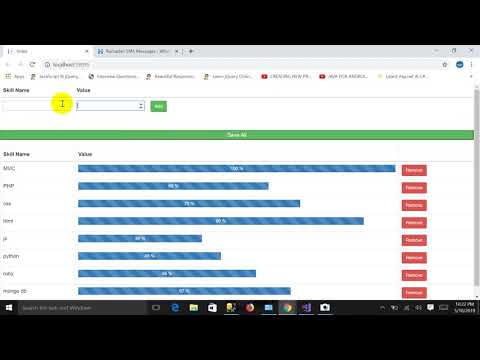
Pass Dynamically Added Html Table Records List To Controller In Asp.net MVC
Controller Code: using System; using System.Collections.Generic; using System.Linq; using System.Web; using System.Web.Mvc; using ...
-
Controller Code: using System; using System.Collections.Generic; using System.Linq; using System.Web; using System.Web.Mvc; using ...
-
Load event: pictureBox3.Image = Image .FromFile( @"C:\Users\salman\Documents\Visual Studio 2013\Projects\WindowsFormsApplication3\W...


